Most pediatric clinics wouldn't go back to paper, but the disadvantages of EMR systems still show up daily: long notes, screen time in the exam room, and costs that keep coming after go-live.
Pediatrics adds its own strain, because one well child visit can involve several vaccines, a screener or two, and more than one caregiver. We've described each disadvantage below alongside what causes it and how you can shrink it.
What Are the Disadvantages of EMR Systems?
Seven disadvantages of EMR systems affect pediatric and general practices alike:
| Disadvantage | What drives it |
|---|---|
| Documentation burden | Bloated templates and copied-forward text |
| High cost | Software, training, and hardware adding up |
| Workflow disruption during rollout | Staff relearning a new system mid-practice |
| Security and privacy risk | Stored patient records attracting attackers |
| System downtime | Outages locking staff out of charts and schedules |
| Data silos between systems | Records not always following the patient |
| Screen time during visits | Splitting the clinician's focus |
Documentation Burden
EMR notes have grown longer and harder to read over the past decade, and much of the added length isn't new information. By one 2020 estimate (Steinkamp et al., JAMA Network Open, 2022) cited in the AMA Journal of Ethics, 50% of a clinician's note was copied and pasted from earlier notes, up from 33% in 2015.
Two issues are driving a lot of this bloat: templates that ask for more detail than a visit needs, and copied-forward text nobody rechecks. The note gets longer, while the part a colleague can actually use stays small.
How to reduce it:
- Template selection: Build a short template for each visit type (e.g., well child vs. sick visit), and hide fields that don't apply to it.
- Chart integrity: Reread copied-forward text before signing. A medication list or history from a few months ago may no longer be accurate.
- AI documentation: Try an ambient AI scribe. In a pilot at Akron Children's Hospital outpatient clinics, a generative AI scribe saved about 1.5 hours of note time per provider each week (Pelletier et al., JAMIA Open, 2025).
High Cost
EMR costs run well past the subscription line. Staff training time, new devices, and data migration push the real number higher, and visit volume often dips right after go-live. Gaps in the EMR add their own costs: every workflow it doesn't cover means buying another piece of software or paying staff to run a manual process around it.
Small practices that budget for the subscription alone tend to come up short in the first year, and this EMR implementation cost breakdown lists what a first-year budget should cover.
How to reduce the cost:
- Cost transparency: Ask for the all-in number before signing, then ask what it leaves out. An all-in quote for the EMR only goes so far if the EMR doesn't cover your gaps, like payments, intake, or digital screeners.
- Implementation timing: Schedule go-live for a slower stretch of the year. For most pediatric clinics, that means avoiding back-to-school physicals and flu season.
- Pricing model: Choose pricing that fits your visit volume. Run last year's visit counts through each quote, since a busy practice can pay more with per-encounter pricing than a flat per-provider fee.
Workflow Disruption During Rollout
Switching EMRs usually means a stretch of slower visits while staff learn the new system. The slowdown is temporary, but it's a common reason that practices delay a switch, even when their current system causes more trouble.
How to reduce the lag:
- System choice: Pick a system that automates more of the work and is easier to learn. There's less for each role to learn and fewer manual steps to get wrong, so the slowdown is shorter.
- Project leadership: Name one owner for the rollout who has explicit authority to hold the go-live date.
- Data hygiene: Clean your data before migrating. A migration copies existing problems into the new system as faithfully as it copies patient records.
- Workflow training: Train each role on the full pediatric office workflow it runs, from check-in to checkout, so staff know where forms live for each visit type.
- Implementation and support model: Ask who configures the system, how each role gets trained, and who picks up after go-live. These EMR implementation challenges and this EMR support evaluation checklist cover what to ask.
Security and Privacy Risk
Hacking and IT incidents grew from 4% of healthcare data breaches reported to HHS in 2010 to 80% in 2025, according to Dolezel et al. (Journal of Multidisciplinary Healthcare), a 2026 analysis of federal breach data. Digital records concentrate patient data in one place, which makes for a more attractive target than paper charts ever were.
How to reduce the risk:
- Access control: Require multi-factor authentication on every account, so a stolen password alone isn't enough to get in.
- Vendor compliance: Sign a business associate agreement (BAA) with every third-party vendor that handles patient data, including billing services and digital intake tools.
- Audit trails: Confirm that audit logging is turned on, so you have a record of who opened each chart when.
- Proxy access: Check what a parent's portal login shows as a child reaches adolescence. Confidential visit details on sexual health, mental health, or substance use can reach a parent through a portal, a visit summary, or an insurer's explanation of benefits unless the system limits what proxies see, and the age where that changes varies by state.
System Downtime
When an EMR goes down, the schedule, medication lists, and immunization histories go with it, often while a full waiting room is still checking in. Outages can come from the vendor, the clinic's own internet connection, or a ransomware attack. Older systems add planned downtime too, going offline for version upgrades, while a modern cloud system can run nearly all upgrades in the background.
How to reduce the burden:
- Downtime plan: Write a downtime procedure before you need one. Provide paper visit forms, an offline copy of the next day's schedule, and a named person who decides when to switch back.
- Vendor track record: Ask each vendor how it reports outages, whether upgrades take the system offline, and who answers the phone during an incident.
- Connectivity backup: If you have a web-based EMR, keep a second internet connection (like a cellular hotspot) ready to use for the front desk and exam rooms.
- Registry access: Keep staff logins to your state immunization registry active, so vaccine histories stay reachable for a well child visit when the EMR is down.
Data Silos Between Systems
A child's record often ends up split between the EMR, the state immunization registry, and outside lab or specialist systems that don't share data by default.
ONC certification sets baseline data-exchange requirements, but the connections a practice actually gets vary by vendor and state.
How to reduce the disconnect:
- Immunization integration: Confirm that your EMR connects directly to your state immunization registry, since re-keying vaccine histories by hand takes staff time and invites transcription errors.
- Data portability: Ask what format your data exports in before you buy a plan, so a future switch doesn't leave records stuck in a proprietary format.
- Interoperability: Push for direct lab interfaces. A faxed result that your staff has to scan back into the chart undermines the point of a digital record.
Screen Time During Visits
Charting during the visit competes with eye contact, and parents notice. A clinician typing through a well child visit has less attention left for the child and the parent's questions.
How to reduce screen time:
- Front-desk automation: Move data entry to before or after the visit, using digital intake forms to collect history and screeners ahead of time.
- Ergonomic setup: Position the screen so it doesn't create a physical or visual barrier between the clinician and the family.
- Ambient documentation: Let an ambient scribe draft the note (from the conversation) for the clinician to review afterward, so attention stays on the child during the exam.
Do These Disadvantages Apply to Pediatric Practices Specifically?
Pediatric practices feel several of these disadvantages more deeply than a general practice does. Vaccine-heavy visits multiply documentation work, and family structures (divorced parents, guardians, siblings on one account) complicate who can see and pay for what.
General EMRs are usually designed around adult care, so pediatric needs, like growth charts, guardian and guarantor relationships, and component-based vaccine billing, can arrive as add-ons or require custom configuration.
Choosing an EMR for pediatrics starts with checking that those features come built in.
Traditional EMR vs. an Operating System
A traditional EMR is a clinical record with billing, scheduling, intake, payments, and other workflows attached through separate modules or vendors. An operating system for a practice is broader: the EMR is one part of it, alongside billing, practice management, and family engagement, all running in one system. Closing a gap becomes the vendor's job, not another purchase or a manual workaround.
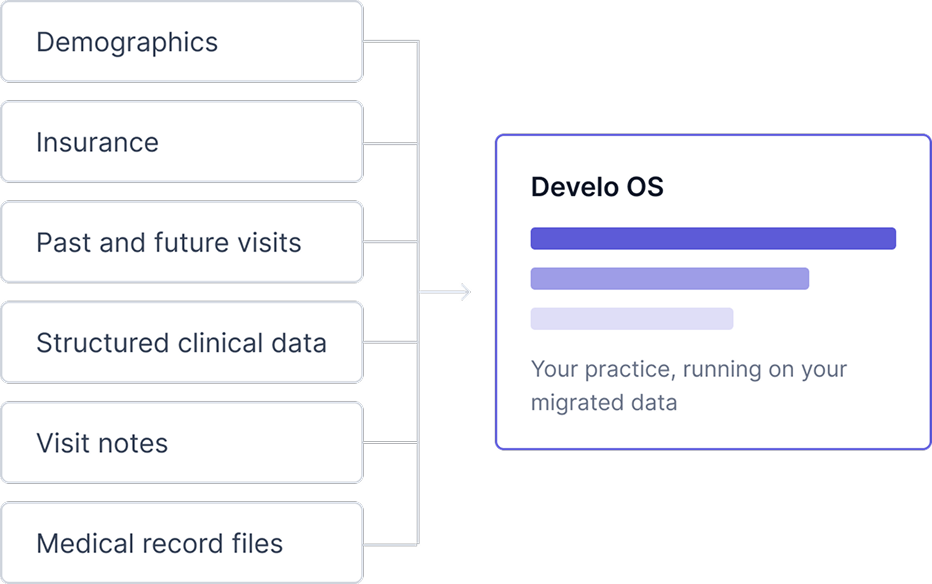
One system also changes what implementation and support look like. With a traditional EMR, go-live means coordinating the EMR, the PM system, and each add-on vendor on their own timelines, and a problem that crosses two of them can bounce between support teams. With one system, there's one implementation to plan, one team training your staff, and one support team that can see the whole workflow, from check-in to the paid claim. Pediatric practices have already moved to Develo from dozens of legacy systems, each migration running on a template built for that specific system.
| Traditional EMR | Develo operating system |
|---|---|
| Charting in the EMR, scheduling in the PM system, and add-ons covering payments, digital screens, visit intake, AI scribe, and more | One AI-native pediatric operating system for charting, billing, practice management, and family engagement workflows |
| Quarterly updates at best, across fragile versions with multi-month testing and roll-out cycles | Minor releases weekly, major releases biweekly, all via background updates with zero downtime |
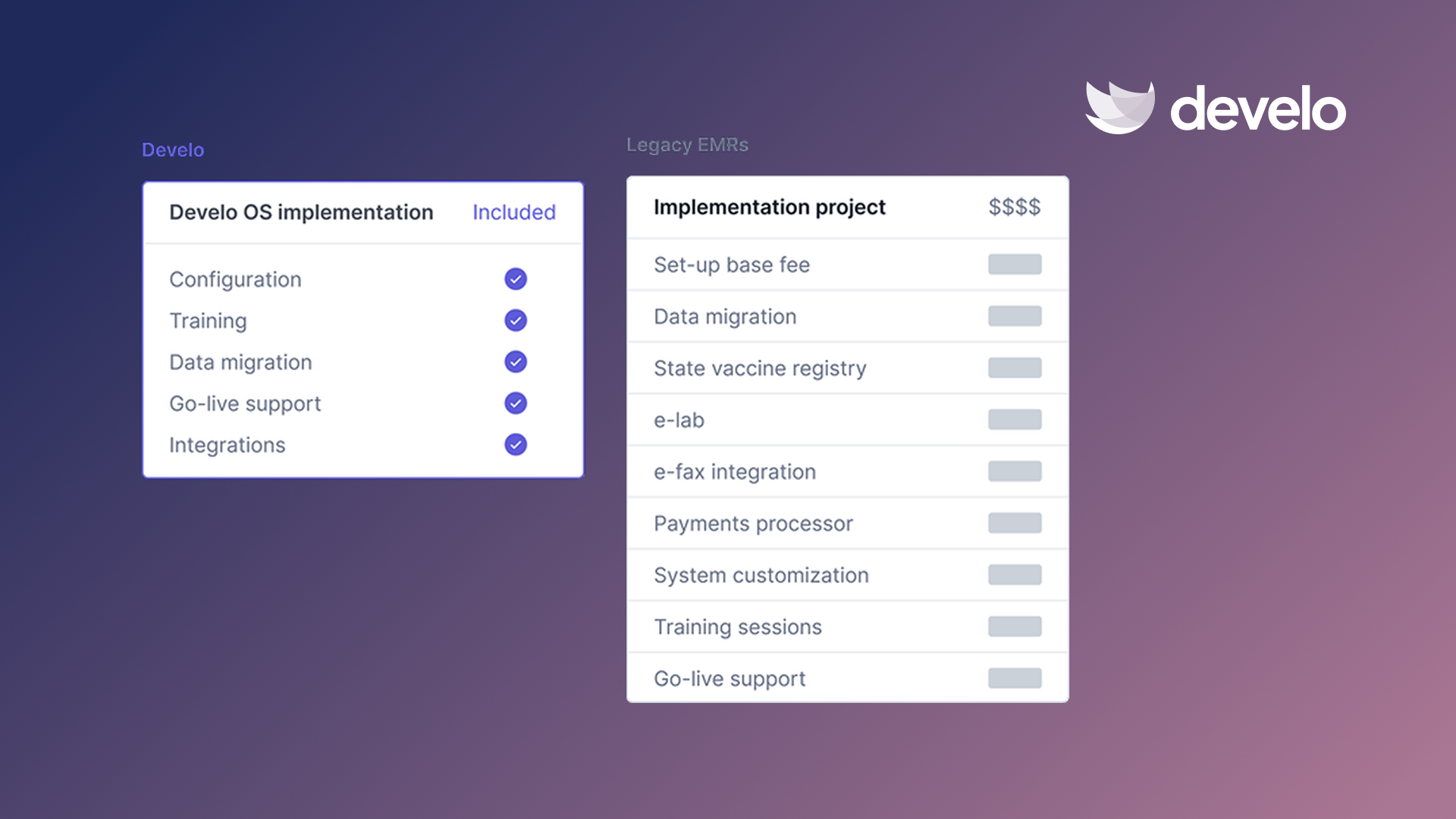
| A five-figure implementation project with a line item for every request | Configuration, training, data migration, and go-live support bundled into your subscription |
| A ticket queue, and a new person who needs the story explained each time | One customer success manager who stays with your practice from implementation onwards |
Where a Pediatric-Native System Helps
No EMR removes all the disadvantages covered above. Cost, rollout disruption, and security risk apply to any system, including Develo. What changes with a system built for your specialty is which disadvantages shrink and by how much.
For documentation, the Develo AI scribe writes directly into the existing visit note, at intake and in the exam room. It reads pertinent chart data such as growth, immunizations, and screening results alongside the conversation, and a clinician approves every section before it enters the note.
Ask Develo answers any question about a patient on demand, turning 15 minutes of chart review into 60 seconds, with answers linked back to the medical record. When the history is one question away, the note doesn't have to carry everything forward.
On the topic of vaccines and billing, Develo connects bi-directionally with supported state immunization registries, so administered doses go up and outside records come down without re-keying.
Automated charge capture applies pediatric rules for codes, units, and modifiers by visit type, while final coding stays with the provider.
Implementation is bundled into the subscription: configuration, training, data migration, and go-live support, with no implementation fee, and practices are configured before their first login.
Updates ship in the background with zero downtime, and support comes from a fully onshore, US- and Canada-based team, with an engineer on call around the clock for critical issues.
Develo doc intel auto-tags inbound e-faxes and uploaded files for single-click filing into the right chart, and Develo shares data with HIEs, children's hospital networks, and insurers in industry-standard formats, including C-CDA documents, 837 claims, and ADT feeds. Full patient records export in FHIR format.
Digital intake reaches families by text, with no app to download or family portal login, and the family portal carries messages, records, and payments, with siblings in one view.
If you're weighing a switch, this roundup of the best EMR for small pediatric practices compares seven options side by side.
Book a demo to see how Develo handles documentation and charge capture on your own visit types.
Frequently Asked Questions
What Are the Main Disadvantages of EMR Systems?
The main disadvantages of EMR systems are documentation burden, high cost, and security risk. Rollout disruption, system downtime, and data silos also come up often, and charting during visits can pull attention away from the family. Each can be reduced, though none goes away completely.
How Can a Practice Reduce EMR Documentation Burden?
Trim templates to each visit type, check carried-over text against today's visit, and consider an AI scribe. At Akron Children's Hospital, providers using a digital scribe spent about 2.8 fewer minutes on notes per visit.
Are EMR Systems a Security Risk?
Yes, about four in five healthcare data breaches reported to HHS in 2025 came from hacking or IT incidents. Multi-factor authentication, signed BAAs with every vendor, and active audit logging are three practical safeguards.
Do the Disadvantages of EMR Systems Apply More to Pediatric Practices?
Several do, because pediatric visits carry more vaccine and screening documentation, and general systems often lack fields for growth tracking and family relationships. A system built for pediatrics includes those fields from the start, though setup and training still take time.
How Much Does an EMR Typically Cost, Including Hidden Fees?
Expect to pay for more than the license: onboarding, devices, lost visit time while staff get up to speed, and the software or staff time needed to cover what the EMR doesn't all count toward the total. Get a written first-year quote from each vendor so you can compare them on equal terms.

.avif)