.avif)
An EMR data migration moves years of patient records from your old system to a new one, and it's one of the parts of switching EMRs that practices worry about most. These nine steps take you from planning through the first 60 days after go-live, keeping records intact the whole way.
What Is EMR Data Migration?
EMR data migration is the transfer of patient records from one electronic medical record (EMR) system to another. It includes demographics, problem lists, medications, allergies, immunizations, results, and clinical notes.
How a record moves depends on what kind of record it is. Two kinds of data behave differently, and the difference decides how much work each one takes:
- Discrete data: structured records that land in fields the new system can read and use, such as demographics, visits, and select clinical data (e.g., vitals, immunization history).
- Document data: scans, PDFs, and signed forms that move as files someone has to open and read.
Most practices migrate a defined set of discrete data, convert some records to documents, and leave the rest in an archive.
Your Right to Your Own Data
Most practices start shopping for a new EMR unaware that the rules are already on their side. Your old vendor has to return your data.
Federal certification rules require every certified EMR to produce a full electronic export of your records. The rule covers two exports: one for a single patient's records, and one for your entire patient population, which ONC says lets a practice migrate all of its records to any health IT system of its choosing. That population export is what a practice relies on when switching to a different system.
That export requirement has applied to certified EMRs since December 31, 2023. The rules also say what that export looks like. You should receive an electronic file that your new system can read, and your vendor must publish documentation explaining the file's format so your migration team can work with it. Before you negotiate, look your current system up on ONC's Certified Health IT Product List. The export rights above attach to certified products, so a system without a current certification gives you less leverage.
Information blocking, which includes stalling for months or charging a punitive fee to release your data, is prohibited under federal law. Three things to settle in writing before you sign with anyone new:
- Extraction cost: what the outgoing vendor will charge for anything beyond the certified export, quoted as a firm number. A fee for the certified export itself, when you're switching systems, isn't covered by the information blocking rules' fee exception, so a vendor charging one takes on real risk.
- Format and documentation: the export format you'll receive, and where its documentation is published.
- Legacy access: how long you keep read-only access to the old system after cutover.
Once the data lands in the new system, your practice is still the covered entity responsible for it under HIPAA. The new vendor shares that duty as a business associate, which is why the BAA in step 3 matters.
What to Migrate and What to Archive
What you migrate and what you archive comes down to one of three approaches:
- Full migration: everything moves into the new system.
- Partial migration: only selected data moves; the rest stays behind.
- Hybrid migration: active clinical data moves, and the rest goes to a searchable archive.
Most practices choose a hybrid approach: moving everything is often expensive and usually unnecessary, and moving too little can leave a clinician short of the history they need mid-visit. The table below shows the split most practices land on.
Two different clocks apply here. HIPAA sets no retention period for the medical records themselves, so how long you keep those is up to state law. HIPAA does set one deadline of its own.
Compliance documentation must be kept for six years from the date it was created or last in effect, whichever is later.
The EMR Data Migration Process in 9 Steps
Work the nine steps in order. Each step depends on the one before it, and the early ones are where the time is saved.
1. Name an Owner and Define Success
Appoint one person accountable for the migration, with authority to hold the go-live date, plus a clinical champion who speaks for the exam room. Agree up front on what success means, including your target data accuracy and the downtime you can absorb.
2. Inventory What You Have
List every data type in the old system, from patients and active problems to medications, allergies, immunizations, growth and vitals, results, documents, schedules, open orders, and accounts receivable. You cannot scope a migration you haven't counted.
3. Lock Your Exit Terms in Writing
Confirm the export format, the extraction cost as a firm number, and how long you keep read-only access to the legacy system. Get a signed BAA from everyone who will touch the data, since HHS requires one from any business associate handling protected health information.
4. Clean and Deduplicate the Source
Merge duplicate charts, correct broken demographics, and standardize name and date formats. A migration copies your problems into the new system as faithfully as it copies your records.
5. Back Up Everything and Test the Restore
Take a full backup before anyone touches the data, then confirm you can restore from it. An untested backup is an assumption.
6. Map Every Field
Decide where each element in the old system lands in the new one, and rule on anything with no natural home. Document the map, because this is what you validate against later.
7. Run a Test Migration Into a Sandbox
Load a few hundred charts covering your real mix of visit types before committing to the full transfer. Fix the mapping, then repeat until the sample comes through clean.
8. Validate, Train, Then Cut Over
Reconcile the record counts on both sides, then open real charts and compare them against the source. Have each clinician sign off on a sample of their own patients' charts. Train staff on the new workflows before go-live, and schedule the cutover for a long weekend in a slow stretch of the pediatric calendar, usually late spring, ahead of back-to-school physicals and the fall vaccine push. Have a written rollback plan ready in case validation fails at cutover.
9. Monitor the First 60 Days
Re-test every interface, since labs, registries, and clearinghouse connections break silently. Ask clinicians to flag missing history during live visits, and work the legacy A/R to zero before switching billing off.
Document what moved and what didn't for anyone responding to a records request later.
Leave the legacy system readable throughout all nine steps. A parallel period costs a little in licensing and saves a lot in panic.
Where Migrations Go Wrong
What Pediatric Practices Have to Watch
Pediatric records are built on connections that general migrations tend to lose: growth over time, family links, immunization histories.
- Immunization history and registry reconciliation: every dose, lot number, and whether it was VFC or private stock has to survive the move. Afterward, reconnect to the state registry and reconcile the records.
- Growth as a series: a single percentile is a snapshot, and growth velocity or a drop across percentile lines only shows against the earlier measurements, so growth data has to migrate as a full series.
- Family and guarantor structure: siblings, split custody, and multiple guardians are relational data, and relationships are what migrations most often break.
- Adolescent confidentiality: state minor-consent laws protect parts of a teen's record, so confirm those protections still hold after the move and that a family portal doesn't expose something it shouldn't.
- Screening scores: a developmental screen is only useful in the new system if the tool, the score, and the interpretation all arrive together.
- A longer retention clock: pediatric records are typically held for years after the age of majority, so the legacy archive must last far longer than an adult practice would ever need.
Migrating Into a Pediatric Platform
An EMR data migration into a general system means building a home for growth charts, immunization records, and family relationships. Develo is the AI-native pediatric operating system built solely for independent pediatric practices, unifying charting, billing, practice management, and family engagement in one modern system. Growth, immunization, and family relationships already exist as native fields, so there's less to map by hand, and pediatric practices have already moved to Develo from dozens of legacy systems.
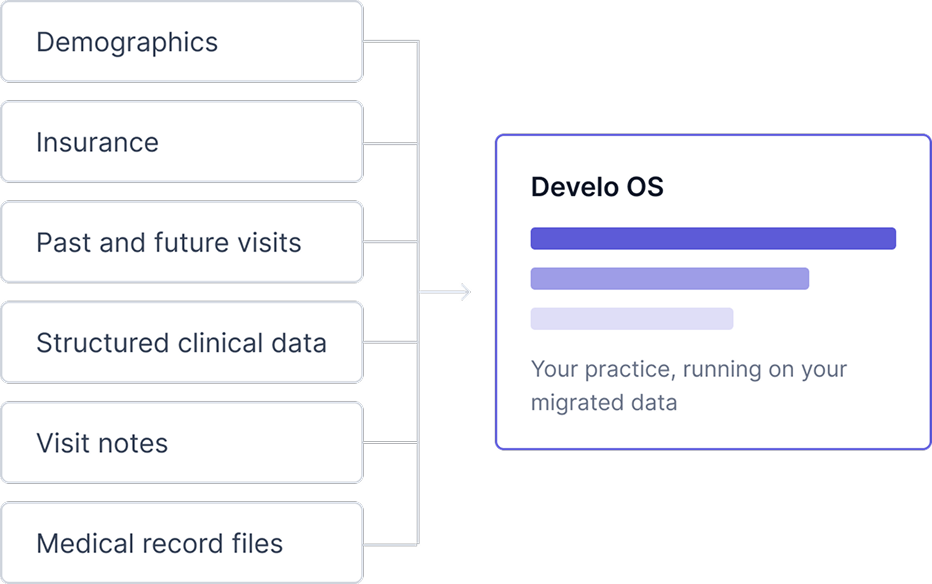
- Migration templates by EMR: every migration runs on a pediatrics-optimized template built for that specific system, bringing across demographics, insurance, visits, structured clinical data, and medical record files.
- Registry connection: Develo connects to the state vaccine registry bi-directionally in real time, pushing up administered doses and pulling down immunization records.
- Migration bundled in: data migration, configuration, training, and go-live support are included in your Develo subscription, with no implementation fee.
- No lock-in either way: Develo publishes its own EHI export documentation, so the export rights in this article apply to Develo too.
Develo fits a practice ready to run charting, billing, practice management, and family engagement on one pediatric platform, since it also replaces the bolt-on intake, communication, and payment tools that sit around a legacy EMR. Book a demo to see how a pediatric migration lands on your own data.
Frequently Asked Questions
How Long Does an EMR Data Migration Take?
Most practice migrations take several weeks to a few months, depending on record volume, the number of data types you move, and the cleanliness of the source data. Cleaning and field mapping take longer than the transfer itself, so start those early.
Can Our Old EMR Vendor Refuse to Hand Over Our Data?
No, certified systems must support electronic export of your health information, including when you switch vendors. A vendor who obstructs that or prices it unreasonably may run into the information blocking rules. Get extraction terms in writing before you sign.
Should We Migrate All of Our Records?
Most practices migrate active clinical data and archive the rest. Demographics, active problems, immunizations, vitals, and recent results usually move as structured data, visit notes and clinical files move as files, and inactive or closed charts stay in a searchable archive that meets your state's retention rule.
What Should Pediatric Practices Check After a Migration?
Check immunization history, growth series, and family relationships first, since those are most likely to break. Confirm the state registry connection is live and reconciled, that percentile curves show historical points, and that adolescent confidentiality protections survived the move.

.avif)