


A vendor's sales demo may skip the hard cases. You might not see how an EMR handles a 15-year-old's private visit or two siblings whose parents have different insurance.
Cases like these are where software built for adults may lean on workarounds for family records, vaccine tracking, and teen privacy.
An EMR comparison matrix helps you spot those weak points before you sign, and it gives your team one set of standards for every system. You pick what to measure and how much each item counts before the first demo. That keeps your final choice tied to your clinic's priorities.
What Is an EMR Comparison Matrix?
An EMR comparison matrix is a decision-making tool, such as a grid or spreadsheet, that checks every system you're considering against the same set of criteria.
One way to set it up is to list what you're judging down the left side, give each vendor its own column, and rate how each option performs. A 1-to-5 scale is a simple option for scoring.
You can take this a step further by giving each item a weight based on how much it matters to your practice. A 2025 study in PLOS Digital Health used this method to rank three hospital information systems, and the expert-set weights put cost and output quality on top.
In your own matrix, weights let one criterion outrank another. For example, if denied claims eat up your billers' week, billing could count for more than a polished dashboard.
Multiply each rating by its weight and add up the results. The highest total shows which system scored best against your priorities.
Which Criteria Should a Pediatric EMR Comparison Matrix Include?
A pediatric EMR comparison matrix should include criteria covering front-desk, clinical, and billing work, along with the software's total cost.
Here are eight examples you can use as a starting point, with criteria to try and potential weights that add up to 100 points:
- Family and guardian records (15 points): Look for linked sibling charts, room for more than one guardian per child, and a field for the guarantor (the person who pays the bill). Ask how general platforms like eClinicalWorks and athenahealth link family members. Score lower if staff have to enter those connections by hand. Ask how the system registers a newborn who arrives before a member ID, or sometimes before a legal name, usually under the mother's policy until the baby's own coverage is active.
- Immunization workflows (15 points): Check if the system alerts staff to the shots each child is due for, based on the AAP immunization schedule. Look for inventory that tracks Vaccines for Children program doses apart from privately bought stock, and ask whether the system checks each child's VFC eligibility against the stock a dose is drawn from. Ask if the system can both send new doses to your state registry and pull in shots given elsewhere.
- Documentation speed and usability (15 points): Primary care physicians, including general pediatricians, at one academic health system logged about 6.5 hours in the EMR for every 8 hours of scheduled visits from April 2022 to March 2023 (Arndt et al., Annals of Family Medicine, 2024). Ask whether an AI scribe is built in or sold separately.
- Billing and charge capture (15 points): See if pediatric codes, like vaccine administration and developmental screening codes, are added to each visit automatically, and look for checks that catch errors before claims go out.
- Teen privacy and family portal (10 points): Ask if guardians and teens get separate logins, with clear limits on each account. At three children's hospitals, guardians had accessed an estimated 64% to 76% of teen portal accounts that sent messages (Ip et al., JAMA Network Open, 2021). Check what a teen can see and send on their own.
- Age-based screeners (10 points): Find out whether screening forms are assigned by age, completed by families before the visit, and scored straight into the chart.
- Integrations (10 points): Confirm that the system offers two-way connections for e-prescribing, lab orders and results, and e-fax.
- Total cost and support (10 points): Add up license fees, setup costs, and clearinghouse charges for sending claims to insurers. Include any separate tools you'd need to buy. General systems like Kareo (now Tebra) and Practice Fusion sell some patient engagement tools in higher-tier bundles or as value-add options, so check which tier your clinic would need. Fold those costs into each system's price before you compare it with a pediatric-specific EMR.
Treat these numbers as a first draft, since your clinic's biggest pain points may call for a different split.
How Should You Weight Each Criterion?
Each criterion's weight should reflect where your clinic loses the most time and money today.
To find those areas, ask one person from every role in the clinic, from the front desk to billing, to name their three biggest daily headaches.
Criteria tied to repeated complaints can then earn more points. Splitting 100 points across your list keeps the math simple. If billers describe hours of manual claim fixes, for example, billing might climb from 15 to 25 points, with the extra 10 taken from a lower priority. Smaller practices with lean teams may want to push cost and support higher, too.
Before you do any scoring, decide on your dealbreakers, such as a working connection to your state's immunization registry. These are pass/fail criteria: any vendor that misses one drops out of the running.
Lock in the weights before the first demo, so a persuasive sales pitch can't change what your clinic decided counts most.
How Should You Score Each Vendor?
During a hands-on demo, have your own staff run each system through the same pediatric visits.
Score every task on a scale you set in advance, such as:
- 1: The task fails or needs a third-party tool.
- 2: The task needs a clumsy workaround, such as typing the same data twice.
- 3: The task works with a small workaround or several extra screens.
- 4: The task works as built, with one or two extra steps.
- 5: The task works as built, in a few clicks.
Give every vendor the same scenarios, such as:
- Registering two siblings whose separated parents carry different insurance plans.
- Charting a 4-month well child visit with vaccines and a sick complaint added, then checking the registry report and billing codes it creates, including the problem-oriented code with modifier 25.
- Ordering a weight-based antibiotic dose for a 12-kilogram toddler, then checking whether the system warns when the dose falls outside the range for that weight.
- Logging in to the family portal as a parent and confirming which parts of a 16-year-old's private visit stay hidden.
- Timing a sick visit note from open to signed.
Use a stopwatch and a click counter for each scenario. In a survey of 870 U.S. physicians, EMR usability earned an average of 45.9 out of 100, a failing grade (Melnick et al., Mayo Clinic Proceedings, 2020). Lower ratings went along with higher odds of burnout.
Have each role on your staff score the criteria it uses daily, and record scores within a day of each demo.
Before you sign anything, you could also call two pediatric clinics close to your size and ask how fast their vendor's EMR support responds when something breaks mid-clinic.
See How Develo Scores on Your Pediatric Matrix
If your EMR comparison matrix gives the most points to pediatric workflows, systems built for children's care will rise to the top.
Develo is the AI-native pediatric operating system built solely for independent pediatric practices, unifying charting, billing, practice management, and family engagement in one system.
For the criteria above, Develo offers:
- Family records: Charts and family portal access follow guardian and guarantor relationships across siblings, including blended families.
- Immunizations: Forecasting checks each child's immunization history against the AAP schedule to recommend the vaccines due and flag invalid doses before they're given. Inventory is tracked by funding source and lot, VFC eligibility is matched to the child's health plan automatically, and a dose pulled from the wrong stock gets flagged. Develo exchanges data in real time with the state registries it supports, sending doses given and pulling in shots given elsewhere, and it connects with VaxCare and Canid for vaccine inventory.
- Documentation: The Develo AI scribe writes into the visit note from the conversation plus pertinent chart data, and a clinician approves every section. It brings in visit context beyond the audio transcript, supports dozens of languages, and never requires copy-and-pasting into your visit note.
- Billing: Automated charge capture sets pediatric codes, units, and modifiers by visit type, including vaccine administration codes and the billing and diagnosis codes for each completed screen, with the final coding call always the provider's. Before a claim goes out, scrubbing rules that Develo maintains either fix the claim automatically or flag it to a billing work queue.
- Family portal: Teens get their own login and can message the practice themselves, and they see adolescent confidential visit summaries while caregivers see a more limited version. Access is set per caregiver, per child, based on guardian and guarantor relationships, shifting at age thresholds the practice sets.
- Screeners: Screeners are built into well child visit templates and go to families ahead of the visit, with no app or login needed. Completed screens are scored automatically and flow into the chart.
- Integrations: E-prescribing runs inside the chart, with each dose checked against the child's latest recorded weight and pharmacy renewal requests arriving in the provider's queue. Native e-fax sends documents straight from the chart, Develo doc intel files incoming faxes to the right patient, and lab orders go out electronically, with results coming back as tasks linked to the order that requested them.
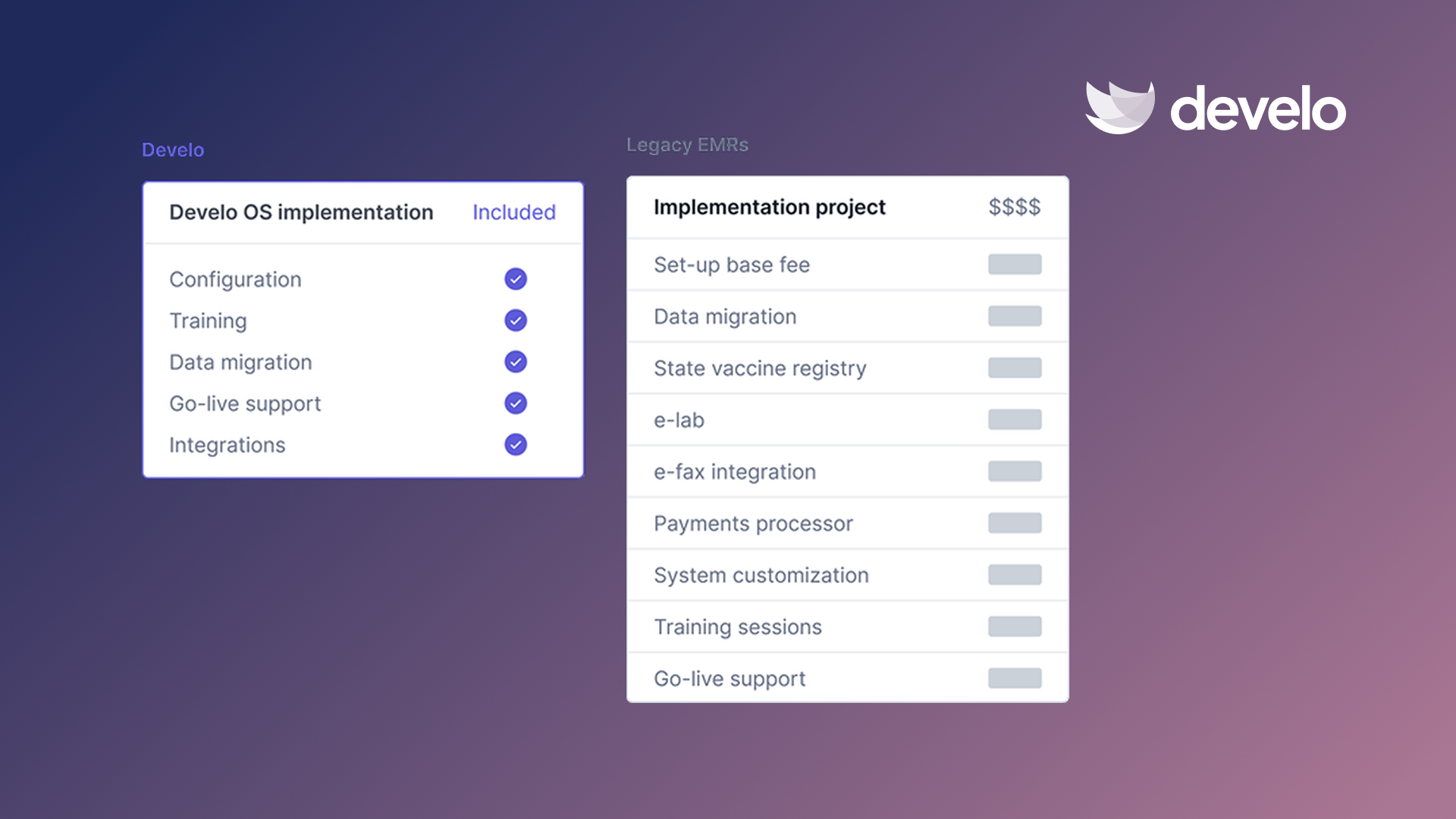
- Cost and support: Develo uses a per-provider monthly fee with no implementation fee, and data migration, configuration, and training are bundled in. A dedicated customer success manager stays on after go-live, backed by an onshore support team and an on-call engineer for critical issues around the clock.
Once your weights and scenarios are set, book a demo and run Develo through the same tests you give every other vendor.
Frequently Asked Questions
Can You Build an EMR Comparison Matrix in a Spreadsheet?
Yes, you can build an EMR comparison matrix in a spreadsheet like Excel or Google Sheets. A SUMPRODUCT formula handles the weighted math for each vendor column in one step.
What's the Difference Between an EMR and an EHR?
The difference between an EMR and an EHR is how far patient data can travel, though some people use the terms interchangeably. An EMR holds a patient's history within one practice, and an EHR is built to share that information with other providers. In practice, the line has blurred: Develo, for example, shares data with health information exchanges (HIEs), children's hospital networks, clinically integrated networks, and insurers in industry-standard formats.
Is an EMR Comparison Matrix the Same as a Feature Checklist?
No, an EMR comparison matrix isn't the same as a feature checklist. A checklist shows whether a system has each feature, but a matrix can also score how well that feature works for your clinic.
What Questions Should You Ask EMR Vendors During a Demo?
Questions to ask EMR vendors during a demo should cover the full cost, contract terms, and support after go-live. Ask how they'd move your existing data, too, and use one question list for every vendor so you can line up their answers side by side.
.png)


.avif)

